xBloom
xBloom Studio Coffee Machine, Drip Coffee Maker, Grinder&Scale, AppControl
Disclosure: We may earn a commission when you buy through links on this page, at no extra cost to you. As an Amazon Associate I earn from qualifying purchases. Learn more
Highlights
- 1. Three Levels of Automation for Any Skill Level: Choose from Autopilot, Copilot, or Free Solo mode. Autopilot handles the entire brewing process automatically. Copilot provides step-by-step guidance. Free Solo gives you full manual control. This coffee machine works for beginners and professional baristas alike.
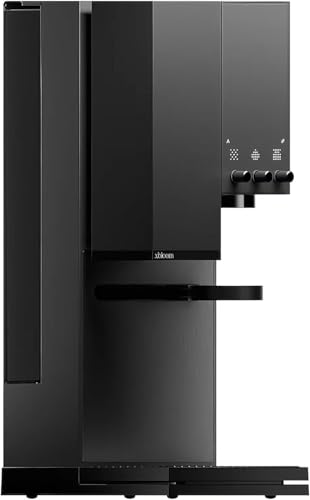
- 2. Intuitive User Interface with Tactile Knobs and LED Matrix: The Studio features physical control knobs and a clear LED Matrix display. You can adjust grind size, water temperature, and flow rate in real time without navigating complicated touchscreen menus.
- 3. Full Customization via the xBloom App: Use the xBloom app to create, adjust, save, and share your favorite coffee recipes. Every brewing parameter can be fine-tuned and synced to the machine instantly. Your perfect cup is saved and repeatable.
- 4. xPod System for Effortless Brewing: Each xPod contains carefully selected whole beans and a built-in filter. Tap the recipe card, pour the beans into the grinder, place the pod into the dock, and press start. No capsules, no extra paper filters, and a simple, streamlined brewing experience.
- 5. What Is Included in the Box: The package includes the xBloom Studio, Omni Dripper 2 with Hyperflow Bottom, 10 paper filters, xPod Dock, Magnetic Dosing Cup, default recipe card, quick start guide, cleaning brush, universal power cord, and a 2-Year xbloom brand warranty. Everything you need is included—along with long-term peace of mind.
- 6. Welcome Coffee Offer: Every xBloom Studio comes with a welcome coffee card — our way of letting you experience how fresh xBloom coffee tastes with your new machine. Your card gives you 50% OFF your first coffee pack (one pack of 16 xPods or one Last Mile Coffee) on Amazon. If your code doesn't work, just contact us and we'll send you a new one.
Why You'll Love It
- Switch between full automation, guided steps, and complete manual control for any brewing style
- Dial in grind size, water temperature, and flow rate quickly with physical knobs and an LED matrix
- Design, store, and share custom recipes on your smartphone with direct machine synchronization
- Brew whole beans simply using xPods with built-in filters without dealing with separate loose filters
- Comes with the Omni Dripper 2, magnetic dosing cup, cleaning brush, and a two-year warranty
Pros
- +Three distinct automation modes for any experience level
- +Physical control knobs with clear LED matrix feedback
- +App connectivity for custom recipe creation and sharing
- +Integrated grinder and scale reduce separate counter gear
- +Two-year brand warranty included in the box
Cons
- -Requires learning app settings for full recipe adjustments
- -Ongoing xPod use depends on dedicated bean packs
Detailed Review
Serious morning pour-overs often require a cluttered counter of separate scales, specialized kettles, and standalone grinders, but this all-in-one drip coffee maker brings those components into a single organized workstation. Designed for coffee lovers ranging from curious newcomers to experienced home baristas, the xBloom Studio focuses on flexible control. Instead of locking you into one rigid preparation style, the system adapts to your current morning routine, letting you rush out the door with an automated brew or take your time manually tweaking every variable.
Daily operation centers around three distinct automation levels: Autopilot, Copilot, and Free Solo. Autopilot runs the entire brewing cycle automatically from start to finish, which is ideal when you need fresh coffee without hands-on effort before work. Copilot steps in with guided instructions for each phase, helping you understand how timing and pouring influence extraction. For complete creative freedom, Free Solo hands every parameter over to you, granting full manual authority over the entire brew cycle.
Adjusting your brew does not force you to tap through confusing digital menus on a tiny screen. The machine features tactile physical knobs paired with an LED Matrix display, allowing you to alter your grind size, water temperature, and water flow rate in real time as the coffee brews. If you prefer deeper digital customization, the companion xBloom app lets you craft original recipes, fine-tune specific metrics, save your favorite profiles, and sync them directly to the machine so your ideal cup is easily repeatable day after day.
For days when measuring beans feels like too much work, the machine integrates an xPod dock system. Each individual xPod carries whole coffee beans and an integrated filter. You simply tap the recipe card, empty the whole beans into the grinder, dock the pod, and begin brewing, avoiding messy loose grounds or traditional capsules. When you want to experiment with other coffees, the included Omni Dripper 2 with Hyperflow Bottom and paper filters accommodates standard brewing routines.
Because the unit relies on connected software to build, save, and sync custom recipes, anyone who dislikes using a smartphone for kitchen appliances might find the app-based setup cumbersome. Additionally, taking advantage of the quick pod workflow requires purchasing compatible xPod packs rather than standard grocery bags of pre-ground coffee.
Verdict: The xBloom Studio is an excellent match for coffee enthusiasts who want the precision of a grinder, scale, and temperature-controlled pour-over station in a single compact footprint. It serves both beginners who want push-button ease and experienced brewers who demand manual control over flow and grind. Those looking for an ultra-basic drip machine without app connectivity or specialized pod docks should look toward a traditional automatic brewer instead.
Who Should Buy It
A great fit if you:
- Want an integrated pour-over setup that combines a grinder, scale, and temperature-controlled water delivery in one compact machine.
- Appreciate having tactile knobs and an LED matrix display to make immediate adjustments to flow rate and grind size on the fly.
- Enjoy creating, storing, and experimenting with customized coffee brewing recipes through a connected mobile phone application.
- Value having multiple operational styles, from one-touch automatic brewing to guided steps and total manual control.
Consider something else if you:
- Prefer a completely analog coffee maker that operates without mobile apps, recipe syncing, or digital electronics.
- Want a high-capacity multi-cup thermal carafe brewer designed to make large batches of drip coffee for a crowd.
Before You Buy
Confirm on the listing:
- Check your available kitchen counter space and overhead cabinet clearance to ensure this brewer fits comfortably on your surface.
- Verify that your mobile device meets the operating requirements to download and run the xBloom companion application.
- Confirm the contents of the package to ensure the Omni Dripper 2, dosing cup, cleaning brush, and power cord are listed.
- Review the details of the welcome coffee offer card to know how to redeem your discount on bean packs through Amazon.
How to compare your options: Focus on how much direct control you want over the pour-over process versus how much automation you need on busy mornings. Many coffee makers offer only a single brewing mode, whereas this model provides three distinct operational modes ranging from automated to fully manual. Also consider whether you want an all-in-one appliance with an onboard grinder and scale, or if you prefer keeping your grinding equipment separate from your brewing water system.
Getting the Most From It
Start by reading through the quick start guide and setting up the xBloom application on your phone so you can immediately explore default recipes and sync customized parameters to the machine. Use the tactile knobs to monitor your grind size, temperature, and flow rate on the LED Matrix display as you learn how each adjustment affects your cup.
When using the xPod system, tap your recipe card, pour the whole beans into the grinder, dock the pod properly, and let the automated settings handle the extraction. If you choose to brew with the included Omni Dripper 2 and paper filters, make use of the magnetic dosing cup to keep your coffee prep tidy and spill-free on the counter.
Keep the included cleaning brush nearby to clear stray coffee chaff and dust from the grinding area regularly. Following regular cleaning habits and consulting the manufacturer documentation for basic care will help maintain smooth operation and protect the investment covered by your two-year warranty.
FAQ
What accessories come in the box with the machine?
The box includes the xBloom Studio machine, an Omni Dripper 2 with Hyperflow Bottom, 10 paper filters, an xPod Dock, a Magnetic Dosing Cup, a default recipe card, a quick start guide, a cleaning brush, a universal power cord, and a welcome coffee card.
Can I use this coffee machine without using the smartphone app?
Yes, you can operate the brewer directly using the physical control knobs, the LED Matrix display, and built-in automation modes such as Autopilot or Free Solo without navigating phone menus for every single cup.
What warranty coverage is included?
The machine comes with a 2-year xBloom brand warranty that provides long-term peace of mind against manufacturing defects.
How does the welcome coffee card discount work?
The welcome coffee card gives you 50% off your first coffee pack on Amazon, which applies to either a 16-pack of xPods or one Last Mile Coffee, with customer support available if your code needs replacement.
Does the machine require special coffee capsules?
No, it does not use traditional capsules. The xPod system utilizes recyclable pods filled with whole beans and built-in filters, or you can use standard coffee with the included Omni Dripper 2 and paper filters.
Product Details
| Brand | xBloom |
| ASIN | B0DKKLY1V9 |