xBloom
xBloom Studio Coffee Machine, Drip Coffee Maker, Grinder&Scale, AppControl
Disclosure: We may earn a commission when you buy through links on this page, at no extra cost to you. As an Amazon Associate I earn from qualifying purchases. Learn more
Highlights
- 1. Three Levels of Automation for Any Skill Level: Choose from Autopilot, Copilot, or Free Solo mode. Autopilot handles the entire brewing process automatically. Copilot provides step-by-step guidance. Free Solo gives you full manual control. This coffee machine works for beginners and professional baristas alike.
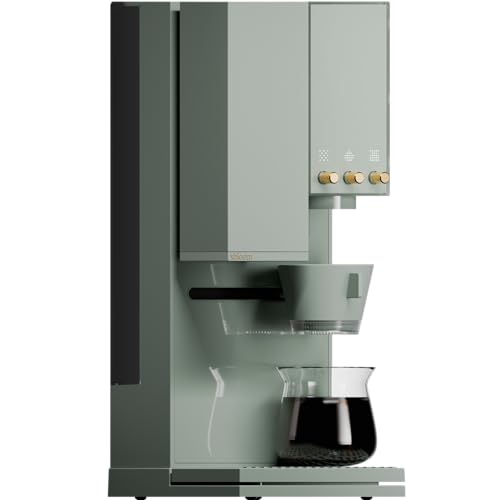
- 2. Intuitive User Interface with Tactile Knobs and LED Matrix: The Studio features physical control knobs and a clear LED Matrix display. You can adjust grind size, water temperature, and flow rate in real time without navigating complicated touchscreen menus.
- 3. Full Customization via the xBloom App: Use the xBloom app to create, adjust, save, and share your favorite coffee recipes. Every brewing parameter can be fine-tuned and synced to the machine instantly. Your perfect cup is saved and repeatable.
- 4. xPod System for Effortless Brewing: Each xPod contains carefully selected whole beans and a built-in filter. Tap the recipe card, pour the beans into the grinder, place the pod into the dock, and press start. No capsules, no extra paper filters, and a simple, streamlined brewing experience.
- 5. What Is Included in the Box: The package includes the xBloom Studio, Omni Dripper 2 with Hyperflow Bottom, 10 paper filters, xPod Dock, Magnetic Dosing Cup, default recipe card, quick start guide, cleaning brush, and universal power cord. Everything you need is included.
Why You'll Love It
- Switch easily between fully automated brewing, guided steps, and complete manual control
- Adjust your grind size, water heat, and flow rate directly using tactile knobs and an LED matrix
- Dial in custom brew parameters through the mobile app to save and repeat preferred recipes
- Brew whole beans effortlessly with the xPod system and dock without handling loose paper filters
- Arrives fully equipped with an Omni Dripper, magnetic cup, filters, cleaning brush, and universal cord
Pros
- +Three distinct operating modes for varied brewing skills
- +Tactile knobs for direct real-time parameter adjustments
- +Integrated grinder and scale combine key prep tools
- +Custom recipe saving and syncing via mobile app
- +Includes essential accessories right out of the box
Cons
- -Requires learning an app for advanced recipe customization
- -Only includes ten paper filters in the box
Detailed Review
Bringing an integrated grinder, scale, and brewer together into a single countertop footprint, the drip coffee maker targets both busy morning drinkers and exacting coffee enthusiasts. Rather than forcing you into a single way of making coffee, it adapts to your available time and preferred level of involvement. Beginners can rely on full automation, while experienced home baristas retain the freedom to tweak each variable.
Daily operation relies on three distinct automation levels: Autopilot, Copilot, and Free Solo mode. Autopilot runs the complete brewing cycle on its own, making it convenient when you need a cup quickly without monitoring the process. Copilot provides step-by-step guidance along the way, while Free Solo hands over complete manual authority. Controlling these variables happens directly at the machine through physical knobs paired with an LED Matrix display, allowing you to modify your grind size, water temperature, and water flow rate in real time without digging through digital submenus.
For deeper customization, the companion xBloom app lets you craft, adjust, store, and share precise brewing recipes. Any recipe parameters created on your mobile device sync directly to the machine, making it straightforward to recreate specific extraction profiles consistently. When convenience is the priority, the machine works alongside the xPod system. Each pod holds whole beans alongside an integrated filter, meaning you simply tap the included recipe card, pour the whole beans into the grinder, dock the pod, and begin brewing without handling separate paper filters or traditional capsules.
As an all-in-one setup that includes advanced electronics, digital syncing, and moving parts, the system requires some familiarity with mobile apps if you want to unlock its deep recipe customization. Those who prefer entirely mechanical setups may find the combination of companion software, recipe cards, and multi-mode knobs more involved than a simple one-button brewer. Additionally, high-volume households will note that the included starter pack contains only ten paper filters for the Omni Dripper 2 before replacements are needed.
Verdict: The xBloom Studio is an excellent choice for coffee lovers who want flexible brewing routines that range from effortless automatic cycles to precise manual adjustment. If you want an integrated brewer, grinder, and scale system with tactile controls and recipe saving, this machine delivers dependable versatility, though purists seeking an entirely analog routine should look elsewhere.
Who Should Buy It
A great fit if you:
- Want the option to toggle between quick automated cycles on busy mornings and complete manual brewing control on relaxed weekends.
- Appreciate tactile controls like physical adjustment knobs and LED feedback rather than relying strictly on touchscreen navigation for everyday adjustments.
- Enjoy saving, fine-tuning, and repeating detailed coffee recipes using mobile connectivity alongside an integrated scale and grinder.
- Prefer the convenience of an integrated whole-bean pod system that grinds fresh coffee directly into a built-in filter dock.
Consider something else if you:
- Prefer a strictly analog pour-over setup without motorized parts, companion mobile apps, or digital recipe syncing.
- Want a basic, traditional single-switch drip coffee maker that does not include integrated grinding or precision adjustments.
Before You Buy
Confirm on the listing:
- Check your countertop clearance to ensure the brewer fits under your kitchen upper cabinets alongside your workspace.
- Confirm the operating system requirements for the xBloom mobile app on your smartphone or tablet before setting up recipes.
- Check whether your preferred whole beans are available in compatible xPods or if you will primarily use the Omni Dripper 2 with standard coffee beans.
- Verify power outlet placement near your brewing station for routing the included universal power cord comfortably.
How to compare your options: Consider whether you prioritize manual control, automated ease, or a combination of both. Many standard drip machines limit you to a single automated cycle without access to grind size or flow rate adjustments. The xBloom Studio differentiates itself by providing physical control dials, a companion recipe app, and three tiered operating modes that adapt to diverse brewing preferences.
Getting the Most From It
Start by reading the included quick start guide to familiarize yourself with the default recipe card, Omni Dripper 2 with Hyperflow Bottom, and physical knobs. Keep the magnetic dosing cup properly positioned when measuring and transferring whole beans to prevent stray grounds around the dock area.
Take advantage of the LED Matrix display to monitor real-time changes whenever you tweak water temperature, flow rate, or grind settings during Free Solo mode. Once you discover an extraction ratio and temperature you enjoy, log it into the xBloom app so you can sync and repeat that exact cup later.
Maintain the equipment regularly by utilizing the included cleaning brush around the grinding path and pod dock to clear out loose coffee particles. Inspect the Omni Dripper and paper filter seating before starting each brew to maintain steady flow through the Hyperflow Bottom.
FAQ
What comes inside the package?
The box includes the xBloom Studio machine, Omni Dripper 2 with Hyperflow Bottom, 10 paper filters, an xPod Dock, a Magnetic Dosing Cup, a default recipe card, a quick start guide, a cleaning brush, and a universal power cord.
Can I adjust brewing settings directly on the machine without a phone?
Yes, the machine features physical tactile control knobs and an LED Matrix display. These controls allow you to adjust water flow rate, water temperature, and grind size in real time without navigating menus.
What are the three brewing modes?
The machine offers Autopilot, Copilot, and Free Solo modes. Autopilot carries out the entire brew cycle automatically, Copilot provides step-by-step guidance, and Free Solo delivers full manual control.
Do I have to use pre-packaged capsules to make coffee?
No, the machine does not use standard capsules. It works with whole beans via the xPod system or whole beans brewed using the included Omni Dripper 2 and paper filters.
What does the xBloom app do?
The app allows you to create, adjust, save, and share your personal coffee recipes. Any parameters fine-tuned in the app can be synced directly to the machine for consistent repeatability.
Product Details
| Brand | xBloom |
| ASIN | B0G16CP249 |