
Fellow Aiden Review: Features, Trade-Offs, and Value
Disclosure: We may earn a commission when you buy through links on this page, at no extra cost to you. As an Amazon Associate I earn from qualifying purchases. Learn more

Fellow Aiden review: what the precision drip brewer documents, what depends on its app, and simpler alternatives for fixed routines.
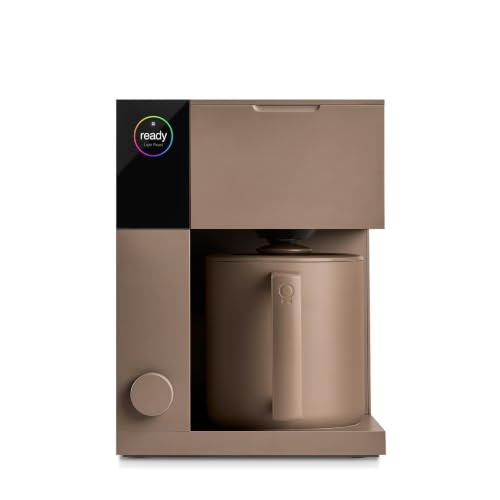
This Fellow Aiden review covers the Fellow Aiden Precision Coffee Maker, a programmable drip brewer that makes anything from a single cup to a 10-cup thermal carafe, with roast presets, custom brew profiles, a cold brew mode and app scheduling. It is aimed at coffee drinkers who want pour-over style control from a machine, without standing over a kettle every morning.
If you want the short answer, start with the quick verdict. If you are weighing the Aiden against simpler brewers such as a Moccamaster, the sections on brewing, convenience, cleaning and cost explain what this machine documents, what depends on its app and firmware, and what it cannot promise.


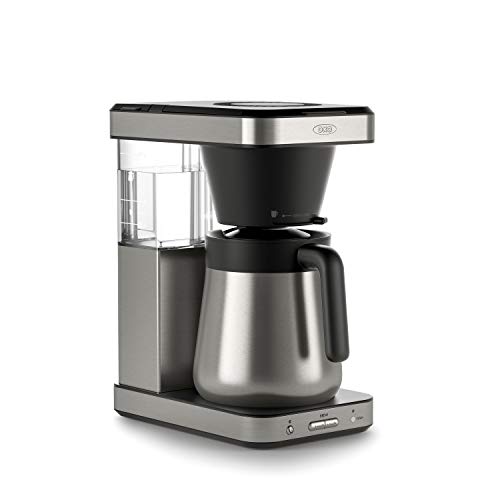
Quick Verdict: Who Is Fellow Aiden For?
Who Should Consider It?
The Aiden suits people who buy different roasts and want to adjust brewing for each, or households that switch between one cup and a full pot. Presets for light, medium and dark roasts and cold brew give a starting point, custom profiles let you fine-tune, and scheduling means coffee can be ready when you wake up. You will want good grounds or a burr grinder to make the most of it.
Who Should Choose Another Format?
If you want one button and no settings ever, a simpler brewer like a Moccamaster suits you better. If you want espresso or milk drinks, the Aiden makes only brewed coffee and cold brew, so look at an espresso machine. If budget is tight, a basic programmable drip maker costs a fraction of the price. The Aiden's compromise is cost and a learning curve.
Version, Specifications, and What Is Included
This review covers the Fellow Aiden Precision Coffee Maker sold on Amazon US with a thermal carafe, at around $400. Fellow sells it in more than one finish, and some listings carry a color name such as Storm Blue; the feature lists are the same. Features that depend on the companion app, such as scheduling and profile editing, can change with firmware updates, so check the current app notes after setup.
Two Aiden listings on Amazon US carry the same title and feature copy, one with a longer sales history than the other. They describe the same product, so for this Fellow Aiden review we rely only on the shared feature list and say so where a specification, such as tank or carafe capacity, is not given.
| Item | Fellow Aiden Precision Coffee Maker |
|---|---|
| Machine type | Programmable drip coffee maker |
| Batch range | 1 to 10 cups with interchangeable baskets |
| Brewing control | Precise temperature control, bloom cycle, coffee-to-water ratio guidance |
| Presets | Light, medium and dark roast; cold brew |
| Custom profiles | Create, edit and share via app |
| Scheduling | Button brew or scheduled in advance |
| Serving | Thermal carafe; no-drip batch brew basket |
| Water | Removable water tank (capacity on listing) |
| Filters | Melitta #2 cone filters (single serve) and 8 to 12 cup basket filters |
| Warranty | 2-year standard, optional paid extension for US purchases |
| Price | Around $400 |
A grinder, filters and a scale are not included; the product table lists Fellow's own filters for both baskets.
Setup and Kitchen Fit
Initial Setup
Follow the quick start guide and manual for your unit. Typically you rinse the removable parts, fill the removable water tank, connect the companion app if you want scheduling and profiles, and run a water-only cycle before the first brew. Choose the single serve or batch basket and the matching filter type before loading coffee.
Spend a few minutes in the app on day one. Pick the roast preset closest to your usual beans, note the dose the machine suggests, and brew a small batch before committing to a full carafe. If you register the machine, you also activate the warranty record and the listing's coffee credit offer.
Controls and Access
Basic one-button brewing works from the machine itself. The app adds scheduling, profile editing, recipe sharing and firmware updates. The removable tank lifts out for filling at the sink, and a hidden cord wrap keeps the counter tidy. The thermal carafe sits under the batch basket, while single cups brew straight into your mug.
Working Clearance
Check the listing's dimensions in inches before buying, then allow space to lift the tank out and to open the brew basket area. If you plan to brew single cups into tall travel mugs, measure the clearance under the spout. Leave room beside the machine for a grinder and scale if you use them.
Because the Aiden fills from a removable tank, it can live under upper cabinets as long as you can slide the tank out. Plan an outlet nearby, and remember the hidden cord wrap lets you keep the cord short and tidy on the counter.
Brewing and Serving Results
Verified Capabilities
Fellow documents precise temperature control, a bloom cycle and optimal coffee-to-water ratios, with the machine calculating how much coffee you need for any batch. A dual showerhead spreads water evenly across either basket, and the interchangeable baskets cover single serve and batch brewing from 1 to 10 cups. Coffee lands in a thermal carafe for batch brews, which avoids a hot plate.
Results or Research-Based Assessment
No brewing trials of our own were done, so this is a research-based assessment. The documentation establishes that the Aiden controls temperature, bloom and ratio, which are the main variables in drip brewing. It cannot establish how your cup will taste, which depends on beans, grind and water. Buyer feedback across the Aiden listings is mixed, so weigh the documented features against your patience for settings and app use.
Practical Limitations
Control only helps if your inputs are good: stale or unevenly ground coffee will not improve because the temperature is precise. The Aiden does not grind, so plan for a burr grinder if you buy whole beans. It makes brewed coffee and cold brew only. If you mostly drink one style of coffee and never change settings, you may pay for control you will not use.
The thermal carafe also changes how you serve. It keeps coffee hot without a warming plate, which protects flavor, but you cannot see the level through glass, and it needs a proper rinse after each use. If you are used to a glass carafe on a hot plate, expect a short adjustment.
Convenience and Distinctive Functions
Verified Capabilities
The Aiden's distinctive features are scheduling, a cold brew preset and shareable profiles. You can press a button or schedule a brew in advance. The cold brew preset starts with a hot bloom and then uses cooler water to make cold brew in hours rather than overnight, according to Fellow. In the app you can create, edit and share recipes and keep the machine updated.
Results or Research-Based Assessment
The documentation establishes what the functions do, not how often you will use them. Scheduling is likely to be the most-used feature for anyone who wants coffee ready at wake-up. Cold brew in hours is a real convenience compared with overnight steeping, but it is a machine mode, not a guarantee of a particular flavor.
Shareable profiles are most useful if you follow roasters or friends who publish recipes. If you never open the app after setup, the machine still brews with one button, but you give up much of what sets it apart from cheaper brewers.
Practical Limitations
App-dependent features mean a phone and connection are part of the experience for scheduling and editing, and firmware updates can change behavior over time. If you prefer appliances that never need updates, that is a real drawback. Cold brew still takes hours, so plan ahead for iced coffee.
On the positive side, a scheduled brew removes the most common morning task entirely. Load the tank, basket and grounds the night before, pick the profile, and the Aiden brews at the set time. For many buyers, that single habit is what justifies the machine over a manual pour-over setup.
Controls and Everyday Use
Customization
Documented adjustments include choosing a roast preset, using cold brew mode, and building custom profiles with your own settings in the app. The machine calculates the coffee dose for a given volume, which helps you keep the ratio consistent as you change batch sizes.
A sensible way to start is to leave the presets alone for a week, then change one setting at a time in a custom profile, such as temperature for a light roast. Changing several things at once makes it hard to tell which adjustment helped. Save profiles that work so you can return to them when you buy the same beans again.
A Complete Daily Routine
For a batch: fill the tank, insert the batch basket with a basket filter, add the coffee amount the machine suggests, choose a preset or profile, and brew into the thermal carafe. Afterwards, discard the filter and grounds, rinse the basket, and rinse the carafe when empty. For a single cup, swap in the cone basket with a #2 filter and brew into your mug.
Multiple Servings
The batch basket covers up to 10 cups in one brew, and the thermal carafe keeps it hot for later servings. Switching between single cups for different people means changing baskets and filters, which takes a moment each time. We do not quote brew times per cup, since they depend on the profile and volume.
For a household where two people want different coffees, the practical approach is one batch for the shared pot and single cups only for the odd one out. Constant basket swaps work, but they add filter changes and a little mess each time.
Cleaning and Maintenance
After-Use Tasks
After each brew, discard the paper filter and grounds, rinse the basket, and wipe any drips from the brew area. Rinse the thermal carafe after use rather than leaving coffee in it. The no-drip batch basket and steam seal help keep the counter cleaner, but still check for grounds around the showerhead area.
Periodic Cleaning and Descaling
Descaling removes mineral buildup and should follow the machine's prompts or the manual's schedule, using a descaler Fellow approves. Deeper cleaning of the carafe and baskets is separate from descaling. Filtered water can slow scale, depending on your tap water. Keep the app updated, since maintenance guidance may come through it.
Do not forget the water tank itself. Empty and rinse it periodically rather than topping up old water for days, and let it air dry now and then. That small habit keeps flavors clean and reduces the chance of film building up inside the tank.
Access and Service
User-serviceable parts include the water tank, baskets, carafe and filter area. Do not open the housing or attempt internal repairs. Fellow offers VIP support for setup, troubleshooting and questions, plus a 2-year standard warranty, and registering a US purchase also qualifies for a coffee credit on Fellow's site, according to the listing.
Purchase Price and Ownership Cost
The Complete Setup
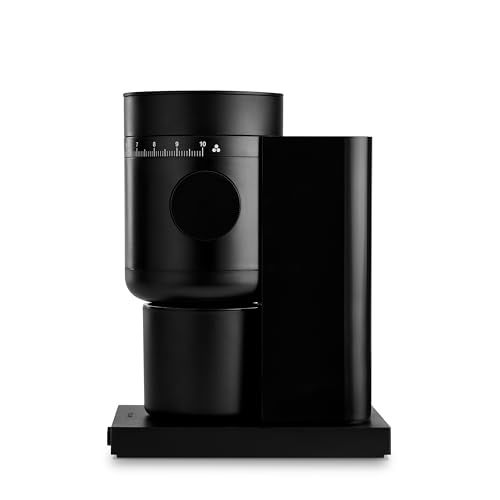
At the time of checking, the Aiden sold new on Amazon US for around $400. A complete setup adds a burr grinder if you buy whole beans, basket and cone filters, and optionally a scale. Fellow's own Opus 2 grinder, listed in the product table at around $200, is one pairing, though any capable burr grinder works.
Recurring Supplies
Plan on coffee, Melitta #2 cone filters and 8 to 12 cup basket filters, plus descaler. Assume one paper filter per brew and descaling on the manual's schedule, which depends on your water. We do not estimate repair costs, since no reliable data supports it.
The filter choice affects running costs slightly. Fellow sells its own basket and cone filters, listed in the product table, but the listing says standard Melitta #2 cone filters and 8 to 12 cup basket filters are compatible, which gives you cheaper options at most grocery stores.
Pros, Cons, and Alternatives
Strengths and Limitations Established Above
Three substantiated strengths: precise temperature and bloom control with roast presets, a 1 to 10 cup range with single serve and batch baskets, and scheduling plus cold brew through the app. Two concrete compromises: a high price, and reliance on an app and firmware for its most distinctive features.
Put simply, the Aiden is a tool for people who care about how their coffee is brewed and want to change it, not a status upgrade for a plain pot. If you would enjoy tweaking a light roast profile on a Saturday, its strengths will show. If you just want hot coffee at 6 a.m., most of what you pay for will sit unused.
When an Alternative Fits Better
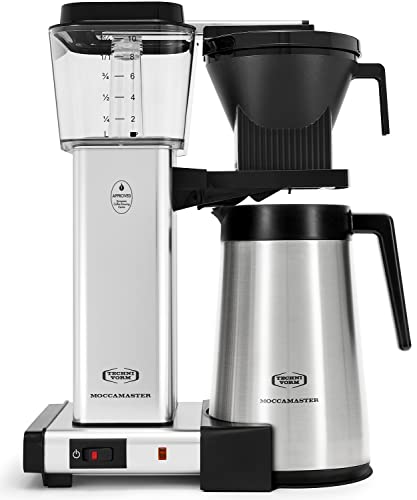
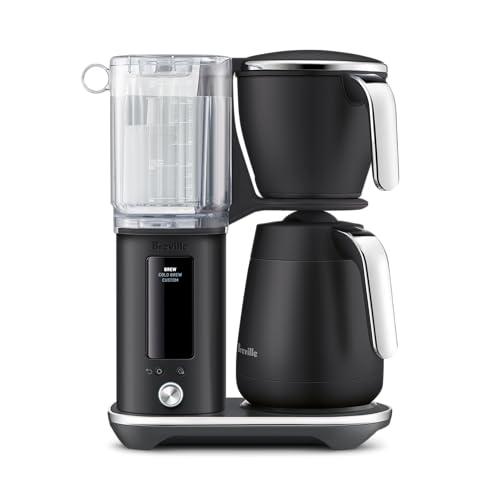
For one-button simplicity and a long warranty, the Moccamaster KBGT fits better. For a programmable alternative with cold brew and two basket styles, the Breville Luxe Brewer is worth comparing. For a lower price with a thermal carafe and single-serve basket, the OXO Brew 8-Cup is simpler, and it is Specialty Coffee Association Golden Cup certified according to its listing, though it lacks the Aiden's profiles and app. See our guide to the best Fellow coffee maker for Fellow's range.
Frequently Asked Questions
Which exact version does this review cover?
This review covers the Fellow Aiden Precision Coffee Maker with thermal carafe, sold on Amazon US in several finishes with the same listed features. App-based functions can change with firmware updates, so check the current app version after setup to see which features and profiles are available on your unit.
What extra equipment is required?
You need ground coffee or a burr grinder, Melitta #2 cone filters for single cups and 8 to 12 cup basket filters for batches, plus a descaler Fellow approves. A smartphone is needed for scheduling and profile editing through the app. A scale is optional but helps with consistency.
What cleaning does daily use require?
Daily care means discarding the filter and grounds, rinsing the basket, wiping the brew area and rinsing the thermal carafe. Descaling and deeper cleaning are periodic and follow the machine's prompts or the manual, with timing that depends on your water hardness.
Is this model worth it for my routine?
It is worth it if you enjoy adjusting brewing for different roasts, switch between single cups and full pots, and want scheduling and cold brew. It is less worth it if you brew the same way every day or dislike app-connected appliances, where a simpler, cheaper brewer serves you better.
Final Verdict
Our Fellow Aiden review finds it a capable choice for coffee drinkers who want precise, adjustable drip brewing, flexible batch sizes, scheduling and cold brew in one machine. The main compromise is price and app reliance, so compare it with simpler brewers in our roundups of the best coffee makers and the best coffee maker for home.


