How To Clean JURA J8: A Model-Specific Guide
Disclosure: We may earn a commission when you buy through links on this page, at no extra cost to you. As an Amazon Associate I earn from qualifying purchases. Learn more

How to clean JURA J8 machines: removable parts, the brew unit cleaning program with JURA tablets, and when descaling or milk cleaning is the real task.
Knowing how to clean JURA J8 machines the right way protects both the taste of your coffee and the machine itself. Like other JURA automatic machines, the J8 handles much of its own care through programs on the display, but those programs still depend on you emptying containers, using the right JURA tablets and following the steps in the correct order.
This guide covers the J8 family as sold in the US, including the J8 twin with its two bean containers, and explains how to identify your version, separate cleaning from descaling and milk care, and work through a cleaning program safely. The exact button steps always come from your own manual.

Quick Answer and Task Boundary
Cleaning a JURA J8 means two things: daily care of removable parts such as the drip tray, grounds container, water tank and milk parts, and the brew unit cleaning program, which uses a JURA cleaning tablet to remove coffee oils. Descaling, which removes mineral scale, and milk system cleaning are separate programs with separate products. When the J8 asks for cleaning, prepare the parts it names, start the cleaning program from the display, add a cleaning tablet when prompted and let the program finish.
Identify the Model and the Right Maintenance Task
Find the Exact Model and Manual
JURA sells the J8 in more than one version, and the J8 twin (for example code 15658 in Diamond Black) differs from the standard J8 in having two bean containers and two grinders. Menus, accessories and milk options can differ between versions, so check the model code on the type plate and download the manual for that exact code from JURA's US website. Do not rely on specifications or steps written for the other version.
Write the code somewhere handy, such as inside a cupboard door. It is what you will need when ordering tablets, a filter cartridge or milk parts, and when you describe a problem to JURA support.
Check Whether This Is Cleaning or Descaling
The J8 tracks maintenance and shows a message when a task is due. A cleaning message relates to coffee oils in the brew unit and calls for a cleaning tablet. A descaling message relates to mineral scale and calls for descaling tablets, unless a compatible JURA filter is managing scale.
A milk system message relates to milk residue. Read the message carefully and match it to the right section of your manual before starting.
Prompts are also a useful reminder that coffee oils build up even when the coffee still tastes fine. Running the cleaning program when asked keeps the brew unit in good shape before residue starts affecting flavor or flow.
What You Need Before Starting
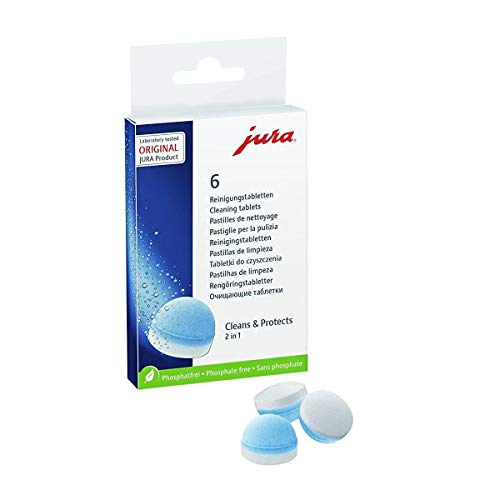
For the brew unit cleaning program, you need genuine JURA cleaning tablets, which JURA labels for its automatic coffee centers and says remove inner oil build-up; one tablet is used per cleaning cycle. Have a container ready that fits under the coffee spout, and empty the drip tray and grounds container so the program can run without interruption.
For daily care, warm water, a soft cloth and mild dish soap for removable parts are enough. Check the manual before putting any part in the dishwasher. For milk system cleaning, use the JURA milk system cleaner or method your manual specifies; it is a different product from the brew unit cleaning tablets.
Keep the machine plugged in and on for powered programs, but switch it off as the manual instructs before handling parts around the spout or brew area by hand.
Set aside time when you will not need a drink, since the program occupies the machine until it finishes. It is a good job for after breakfast or in the evening, rather than in the middle of a busy morning.
How To Clean JURA J8: Step-by-Step Procedure
Prepare the Correct Components
Start with the removable parts. Empty the grounds container and drip tray, rinse them with warm water, dry them and refit them fully so the machine detects them. Empty and rinse the water tank, then refill it with fresh water. If you use a JURA filter, leave it in place for a cleaning program unless your manual says otherwise; filter removal is usually a descaling step, not a cleaning step.
On a J8 twin, check both bean containers have their lids closed, since the machine expects them to be in place. Wipe the coffee spout area with a damp cloth to remove visible residue.
Place a container under the coffee spout large enough for the water the program dispenses; your manual gives a minimum size. Have one JURA cleaning tablet ready, but do not add it until the program asks.
If two people share the machine, agree on who handles maintenance prompts. A cleaning message ignored for days can limit drink preparation on some JURA machines, and it is easier when one person knows the routine.
Start the Approved Task or Program
The brew unit cleaning is a powered program, not a manual wash. You start it from the maintenance menu on the J8's touchscreen when the machine prompts you, or earlier if your manual allows. Because menus differ between the standard J8 and the J8 twin, follow the path in your own manual rather than steps from another JURA model or generation.
The display then guides you through each step. Typically it asks you to empty the drip tray, confirm the container is in place and insert the cleaning tablet into the specified opening at the right moment. Read each prompt fully before you act, and if something is not ready, pause at that prompt rather than skipping ahead.
Leave the machine powered throughout. Switching it off mid-program can leave the cleaning solution inside, and the manual explains how to recover if that happens.
Complete the Cleaning or Descaling Stage
Once the tablet is in, the program runs water through the brew unit in stages, dissolving the tablet and flushing coffee oils out. You will see water dispensed into the container and the drip tray, with pauses in between. These pauses are normal and part of the program.
Do not interrupt the program, and do not add a second tablet or run the program twice in a row unless your manual says to. Using more tablets than specified does not clean better. If the machine stops with an unfamiliar message, check the manual's troubleshooting section before continuing.
The dispensed water is hot, so empty the container carefully and pour it down the sink.
If you are interrupted, for example by a power cut, check the manual for what to do next instead of starting the program again with a new tablet. The machine may continue or ask you to complete a rinse first.
Finish the Required Rinse and Reassembly
When the program ends, it rinses itself as part of the sequence. Empty and rinse the drip tray and grounds container again, refit them, and check that the water tank has fresh water. The display should return to its normal ready screen.
If milk system cleaning is also due, run it separately as your manual describes, using the correct milk cleaner. Wipe the exterior with a soft damp cloth and dry it, avoiding abrasive pads on the touchscreen and housing.
Keep a note of the date and which program you ran. Over a few months, that record shows how often your household triggers cleaning and milk prompts, which helps you buy tablets and milk cleaner before you run out.
Check the Result Before Normal Use
Confirm Completion
A finished cleaning program clears the cleaning message and returns the J8 to its ready state. Check that the drip tray and grounds container are seated correctly and the bean container lids are closed. Then make a normal drink and look for normal flow from the spout. Some owners discard the first cup after cleaning; follow your manual's advice.
Taste is a good final check. If coffee tasted stale or flat before cleaning and is fresher afterward, coffee oils were the cause. If nothing changed, the issue may be the beans, the grind setting or a different maintenance task.
If a Prompt or Symptom Remains
If the cleaning message returns straight away or the program would not complete, check whether a step was missed, such as the tablet not being inserted or a container not detected. Do not start repeated cleaning cycles. If the message persists after a correctly completed program, contact JURA support with your model code and a description of what happened, or see our JURA coffee machine not working guide for safe checks.
Common Mistakes to Avoid
The most common mistake is running the wrong task. Cleaning tablets remove coffee oils, descaling tablets remove mineral scale and milk cleaner removes milk residue. If coffee tastes stale or bitter, cleaning is usually the right task; if flow is slow and a descaling message is showing, descaling is.
The second mistake is treating vinegar, cleaning tablets and descaler as interchangeable. JURA's programs are built around its own products, and vinegar is not part of JURA's instructions. Third, avoid dishwashing or soaking parts that your manual does not list as dishwasher safe.
Finally, do not copy menu paths or accessory details from the standard J8 to the J8 twin, or the other way around, since the versions differ. Our JURA coffee machine maintenance guide explains how the different tasks fit together.
Frequently Asked Questions
Which cleaner is approved for this model?
JURA cleaning tablets are the product the J8's brew unit cleaning program is designed around, with one tablet per cycle as the package states. Descaling uses JURA descaling tablets, and milk system cleaning uses the milk cleaner your manual names. Check the manual for your exact version before buying supplies.
How often should I perform this task?
Run the cleaning program when the J8 prompts you, since it counts drinks and rinses to decide when cleaning is due. Daily, empty the drip tray and grounds container and rinse the water tank. Milk system cleaning is needed more often if you make milk drinks every day.
What if the cleaning or descaling alert remains?
If the alert remains after a full program, confirm the program was not interrupted and that the tablet was inserted when prompted. If it still persists, contact JURA support with your model code rather than running repeated programs, since a remaining alert may point to another issue.
Can I use a generic method from another coffee maker?
No. The J8 uses dedicated programs and JURA tablets, and the steps differ from drip coffee makers and from other JURA models. Water filter questions are covered in our JURA water filter guide, but the cleaning steps themselves should come from your J8 manual.
Keep the Routine Simple
The routine for how to clean JURA J8 machines is straightforward: empty and rinse the removable parts often, run the cleaning program with one JURA cleaning tablet when the machine asks, and keep descaling and milk cleaning as separate tasks with their own products. Always work from the manual for your exact version. For other machines in the range, see our guide to the best JURA coffee machine.