How To Clean JURA Z10: A Model-Specific Guide
Disclosure: We may earn a commission when you buy through links on this page, at no extra cost to you. As an Amazon Associate I earn from qualifying purchases. Learn more

How to clean JURA Z10 machines without guesswork: which task each prompt needs, the approved supplies and the steps to finish.
Knowing how to clean JURA Z10 machines properly comes down to separating four jobs: washing the parts you remove by hand, running the coffee system cleaning program, cleaning the milk system, and descaling or filter care. The Z10 automates much of the work through prompts and one-touch programs, but it still relies on you to load the right supplies, empty containers and follow the manual's sequence.
This guide covers the JURA Z10 fully automatic coffee machine sold in the US, including the current NAB generation (15792 and 15702) and the earlier 40-specialty versions (15820, 15822 and 15823). Because menus and prompts can differ between generations, your model's manual always takes priority over any general routine.

Quick Answer and Task Boundary
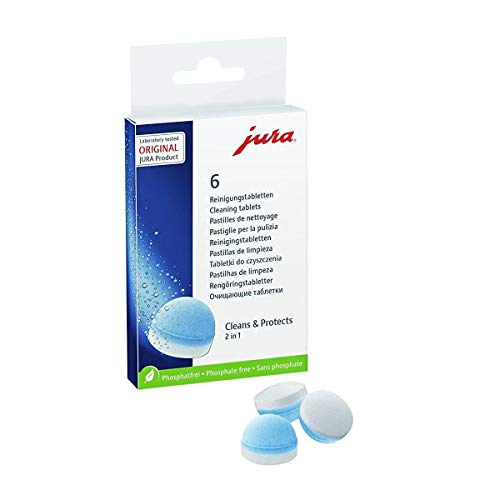
Empty the grounds container and drip tray when prompted, rinse the water tank and wash removable parts as the manual allows. Run the milk system cleaning after milk drinks; current Z10 listings describe it as automatic, at one touch. When the machine asks for a cleaning cycle, run the cleaning program with one JURA cleaning tablet per cycle.
Descaling is a separate task for mineral scale, not coffee oils or milk residue, and it has its own guide. Never swap one task's product for another.
Identify the Model and the Right Maintenance Task
Find the Exact Model and Manual
Find the model code on the rating plate or in the machine's settings and write it down. Z10 listings on Amazon US use codes such as 15792 and 15702 for the NAB generation, which lists 51 specialties, and 15820, 15822 and 15823 for the earlier 40-specialty version; the first Z10 listings described 32 options. Download the manual for your exact code from JURA's US support site and open the care section.
Keep the manual on your phone or printed near the machine. It names the approved supplies, explains each prompt and shows the order of steps for your generation. If you bought the machine secondhand or lost the manual, JURA support can help you identify the generation from the model code.
Check Whether This Is Cleaning or Descaling
Cleaning removes coffee oils and residue from the brewing system, and milk cleaning removes milk deposits from the milk system. Signs you need cleaning: a cleaning prompt on the display, or coffee tasting flat or bitter despite fresh beans. Descaling removes mineral scale from hard water, and it is triggered by its own prompt or by your filter setup. If the display shows a specific request, do that task and nothing else.
What You Need Before Starting
Gather only the supplies your manual approves. For the coffee system cleaning program, that is a JURA cleaning tablet; JURA's 64308 tablets are listed for use with JURA automatic coffee machines and state that one tablet is required per cleaning cycle. For milk system cleaning, use the JURA milk system cleaner your manual names, such as the mini-tab version in the product table.
You also need a container large enough to catch the rinse water under the outlets, typically at least the size your manual specifies, plus a soft cloth and warm water for wiping. For handling removable parts by hand, let the machine cool and follow the manual on whether to switch it off first. Powered cleaning programs run with the machine on, following the on-screen instructions.
Plan to stay nearby while the program runs, so you are on hand when it asks you to empty a container or confirm a step; the program sets its own pace. Keep a spare sleeve of cleaning tablets and milk cleaner on hand, so a prompt never catches you without supplies.
How to Clean JURA Z10: Step-by-Step Procedure
Prepare the Correct Components
Start by emptying the grounds container and the drip tray, then rinse and refit them as the manual describes. Refill the water tank with fresh, cold water, and check that the bean hopper lid and any filter cartridge are seated correctly. If the program needs the milk system connected, connect it as the manual shows.
Do not substitute a homemade recipe for JURA's cleaning tablet or milk cleaner. Vinegar, baking soda or dish soap inside the brewing or milk system can leave residues, foam or odors, and the program is calibrated for JURA's products. The only parts that should touch dish soap are removable parts the manual says can be washed that way, and only the ones it lists as dishwasher safe go in the dishwasher.
Place your container under the coffee spout, and under the milk spout if the program uses it. Make sure the container sits level and will not overflow, since programs can dispense water in several stages.
Start the Approved Task or Program
Manual washing and powered programs are different jobs. Washing removable parts happens with the machine cool, by hand; the cleaning program runs inside the machine and uses water, heat and the tablet. Start the cleaning program from the prompt on the display or from the maintenance area of the menu, following the on-screen steps for your generation.
We do not list button sequences here, because Z10 generations use different screens: the NAB listing describes a 4.3 inch touchscreen with swipe controls and Easy Mode, while earlier versions describe their own interface. Copying steps from another generation is one of the easiest ways to start the wrong program. Follow the wording on your screen and the matching page of your manual.
When the machine asks you to insert the cleaning tablet, add one tablet where the manual specifies, close the lid and confirm. Then leave the machine to work.
Complete the Cleaning or Descaling Stage
Let the cleaning program run to completion without interruption. It will dispense water in stages and may ask you to empty the drip tray or grounds container partway through; do so when prompted and refit the parts before continuing. Use only one tablet per cycle unless your manual says otherwise.
Do not stop the program halfway, and do not start it again immediately unless the manual permits a repeat. Interrupting a cleaning cycle can leave cleaning solution in the system, and the manual explains how to recover if a power cut or mistake stops it.
For the milk system, run the milk cleaning after milk drinks as prompted; current Z10 listings describe automatic one-touch milk system cleaning. When the manual calls for a deeper milk system clean, use the JURA milk system cleaner in the amount and container the manual describes.
Finish the Required Rinse and Reassembly
At the end of the program, the machine rinses itself and returns to its ready screen. Empty and rinse the drip tray and grounds container, discard the water in your container, and wipe the coffee spout area with a damp cloth. Rinse the water tank and refill it with fresh water.
Refit every removable part fully. A drip tray or grounds container that is not seated correctly can trigger prompts or stop the machine from brewing. If the manual recommends discarding the first drink after cleaning, do so before brewing normally.
Wash removable milk parts as the manual allows and let them dry before refitting. Keep milk refrigerated between uses rather than leaving it connected at room temperature. Milk left in the line or container is a common source of odors on any milk-capable machine, so this habit matters as much as the cleaning program itself.
Check the Result Before Normal Use
Confirm Completion
The machine should return to its normal ready display without a pending cleaning message. Check that the drip tray, grounds container, water tank and milk connection are fitted correctly, and that the water tank is full. Brew a drink and confirm it dispenses normally.
If the coffee tastes of cleaner, run the rinse the manual recommends. It also helps to note the date of each cleaning cycle, which shows you how often prompts appear in your household.
If a Prompt or Symptom Remains
If the cleaning prompt is still showing, check the manual's troubleshooting section for that message; a part not seated correctly or a skipped step can keep it active. Do not keep running cleaning programs back to back. If the message persists after following the manual, contact JURA support with your model code. Our JURA Z10 problems guide covers common messages in more detail.
Common Mistakes to Avoid
The most common mistake is using the wrong task for the problem. Coffee oils need the cleaning program and a cleaning tablet; milk residue needs milk system cleaning with milk cleaner; mineral scale needs descaling or proper filter use. Running one in place of another leaves the real problem untouched.
Cleaning tablets, milk cleaner, descaler and vinegar are not interchangeable. Each is made for a different deposit, and only the ones your manual names belong in the machine. Vinegar in particular is not a substitute for JURA's products.
Dishwasher cleaning and soaking are only for parts the manual lists as suitable. Putting other parts in the dishwasher can warp seals or damage finishes, and soaking parts that are not designed for it can trap water.
Finally, avoid copying controls from a different generation or from a video for another model. Z10 versions differ in screens and prompts, so follow your own manual.
One more habit to avoid is postponing prompts for days. A cleaning request that is ignored does not go away, and coffee oils keep building up in the meantime. Running the program soon after the prompt appears keeps each cycle routine and short.
Frequently Asked Questions
Which cleaner is approved for this model?
JURA cleaning tablets are the cleaner for the coffee system program, and JURA milk system cleaner is used for the milk system. JURA's 64308 tablets are listed for JURA automatic coffee machines, one tablet per cycle. Your Z10 manual confirms the exact products for your generation.
How often should I perform this task?
Run the cleaning program when the machine prompts you, rather than on a fixed calendar. Milk cleaning should follow milk drinks as prompted. How often prompts appear depends on how many drinks you make, so a busy household will see them more often.
What if the cleaning or descaling alert remains?
If an alert remains, check that every part is seated and that the program finished, then look up the message in the manual. Do not repeat cycles blindly. If it persists, contact JURA support with your model code and the exact message.
Can I use a generic method from another coffee maker?
No, generic methods such as vinegar cycles from drip coffee makers do not suit the Z10. Its programs are calibrated for JURA's tablets and milk cleaner, and its steps differ by generation. Follow the Z10 manual instead, and treat videos for other machines as background only.
Keep the Routine Simple
Learning how to clean JURA Z10 machines is mostly about responding to prompts with the right supply: a cleaning tablet for the cleaning program, milk cleaner for the milk system, and the manual's method for scale. Check that every part is seated when you finish. For the bigger picture, see our JURA Z10 review, our JURA Z10 maintenance schedule and our guide to the best JURA coffee machine.